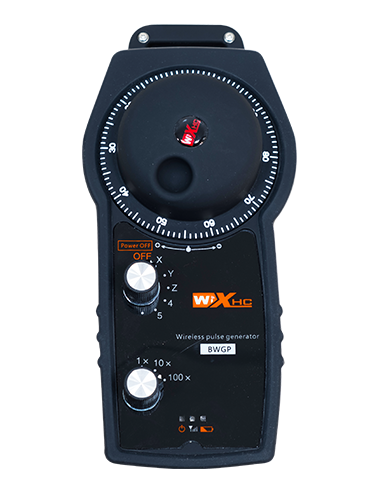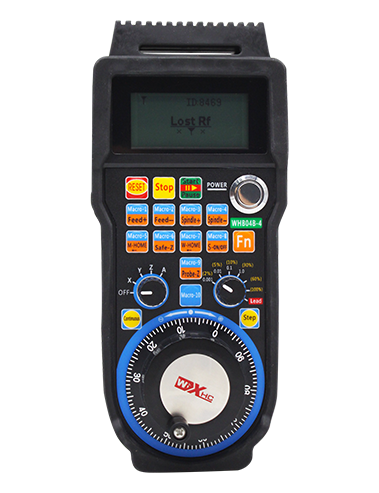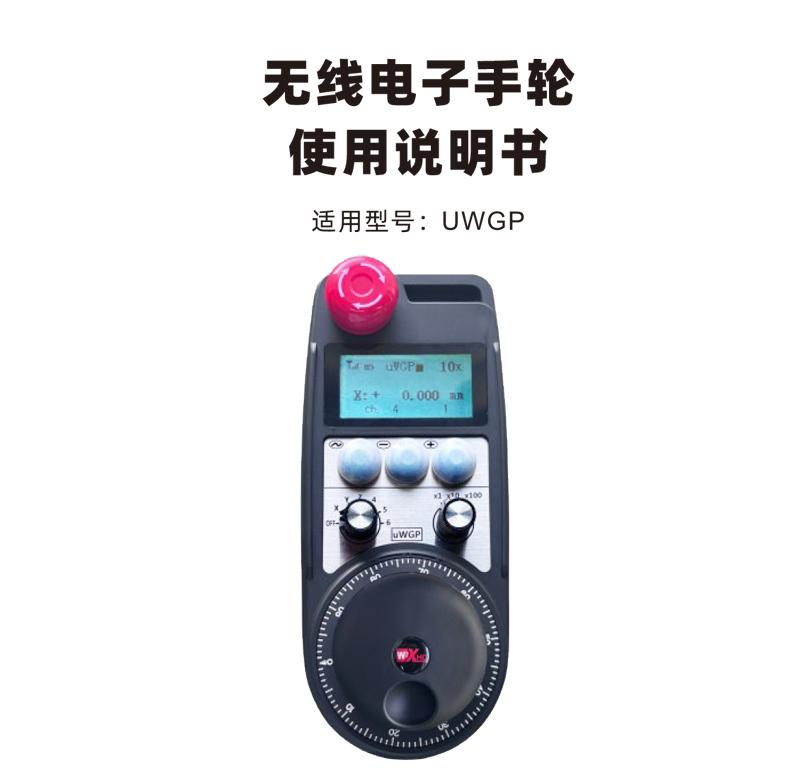

Wireless electronic handwheel is used for manual guidance of CNC machine tools、position、Strike operation。This product uses wireless transmission technology,Eliminates traditional spring wire connections,Reduce equipment failures caused by cables,Free cable drag,Disadvantages such as oil stains,More convenient operation。Widely used in gantry machining centers、Gantry vertical lathe、CNC gear processing machine tools and other CNC machine tools,And it can be adapted to a variety of CNC systems on the market,For example, Siemens、Mitsubishi、Fanako、New generation of CNC system brands。

1.Adopt 433MHZ wireless communication technology,Wireless operating distance 20 meters。
2.Adopt automatic frequency hopping function,Use 32 sets of wireless remote controls at the same time,No effect on each other。
3.Support emergency stop button,And after the handwheel is turned off,Operating the emergency stop button is still effective。
4.Supports 3 custom buttons,Switching quantity IO signal output。
5.Support 6-axis control,Customizable 7-12 axis control。
6.Supports 3-speed multiplier control,Customizable 4-speed magnification control。
7.Support enable button function,Can output the switch quantity IO signal,You can also control the axis selection、Magnification and encoder。
8.Supports axis selection and magnification to modify the encoding type through software。
9.Support pulse encoder,Specification 100 pulses/circle。
10.Supports standard Type-C charging,5V-2A charging specifications,Built-in battery specification 14500/1100mAh。
| Handheld terminal working voltage and current |
3.7V/20.0mA |
| Rechargeable battery specifications |
3.7V/14500/1100mAh |
| Handheld terminal low voltage alarm range |
<3.35V |
| Receiver power supply voltage |
DC5V-24V/1A |
| Receiver emergency stop output load range |
AC125V-1A/DC30V-2A |
| Receiver enables output load range |
AC125V-1A/DC30V-2A |
| Receiver custom button output load range |
DC24V/50mA |
| Receiver axis selects output load range |
DC24V/50mA |
| Receiver magnification output load range |
DC24V/50mA |
| Handheld transmit power |
15dBm
|
| Receiver Receive Sensitivity |
-100dBm |
| Wireless communication frequency |
433MHz band |
| Wireless communication distance |
Barrier-free distance 20 meters
|
| Operating temperature |
-25℃<X<55℃ |
| Anti-fall height |
1(rice) |
| Customize the number of buttons |
3 (indivual) |
| Product weight |
546.86(g) |
| Product size |
200*87*72(mm) |

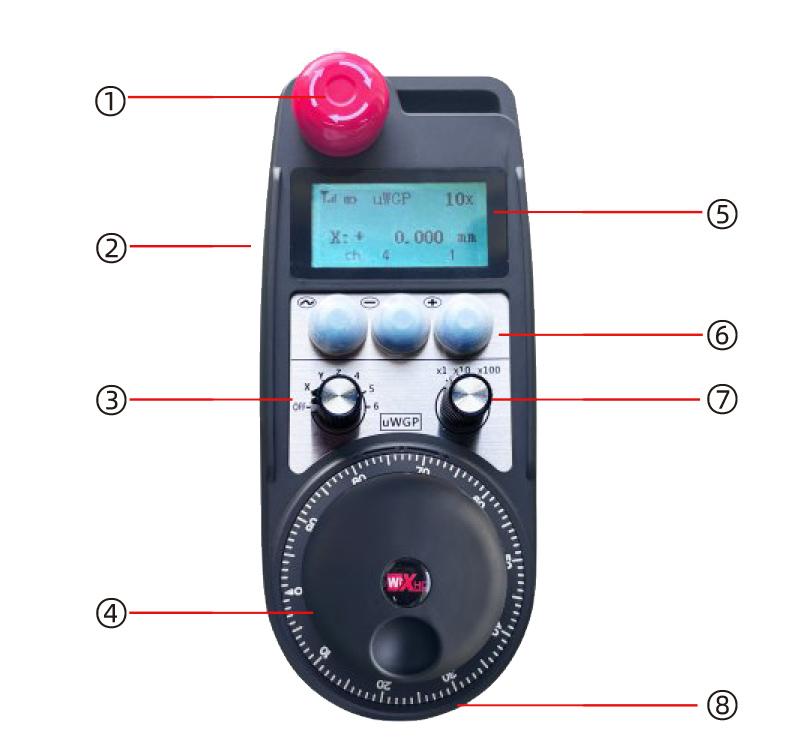
Comments:
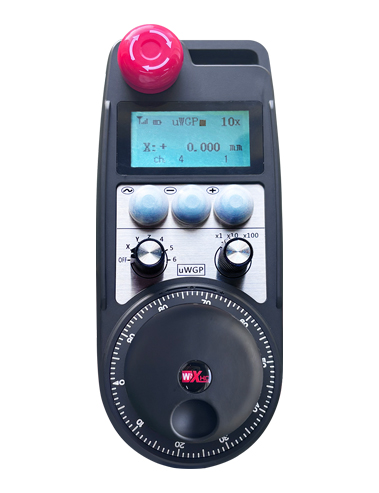
①Emergency stop button:
Press the emergency stop button,Two groups of emergency stop IO outputs on the receiver are disconnected,And all functions of the handwheel are invalid。
Release emergency stop,Emergency stop IO output closed on the receiver,All functions of the handwheel are restored;and close the handwheel
After power,Press the emergency stop button,The emergency stop IO output of the receiver is still effective。
②Enable button:
Press any enable button on both sides,Two groups on the receiver enable IO output conduction,Release the enable button
button,Enable IO output disconnection;And select the plurality in the switching axis,and before shaking the handwheel,Need to hold
The button is enabled;This feature can be cancelled by configuring the software。
③Axis selection switch (power switch):
Press and hold the enable button,Switching the axis selection switch can switch the moving axis controlled by the handwheel。Change this switch from
OFF gear switches to any axis,Handwheel power supply。
④Pulse encoder:
Press and hold the enable button,Shaking pulse encoder,Send a pulse signal,Control the machine shaft movement。
⑤LCD display:
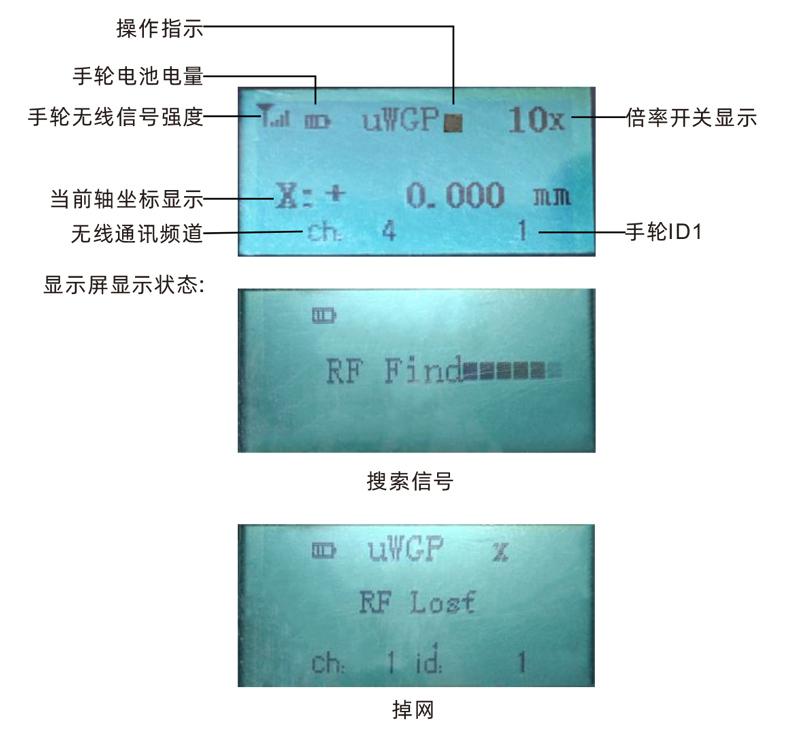
⑥Custom button:
3Custom buttons,Each button corresponds to an IO output point on the receiver。
⑦Magnification switch:
Press and hold the enable button,Switch the magnification switch,The multiplier can be switched by handwheel control。
⑧ Charging port:
Built-in rechargeable battery,Charging with Type-C specification charger,Charging voltage 5V,Charging current 1A-2A;Charging time 3-5 hours。
When charging, the battery icon changes as shown in the figure:

Indicates charging,After full,Battery display is full,No flashing。

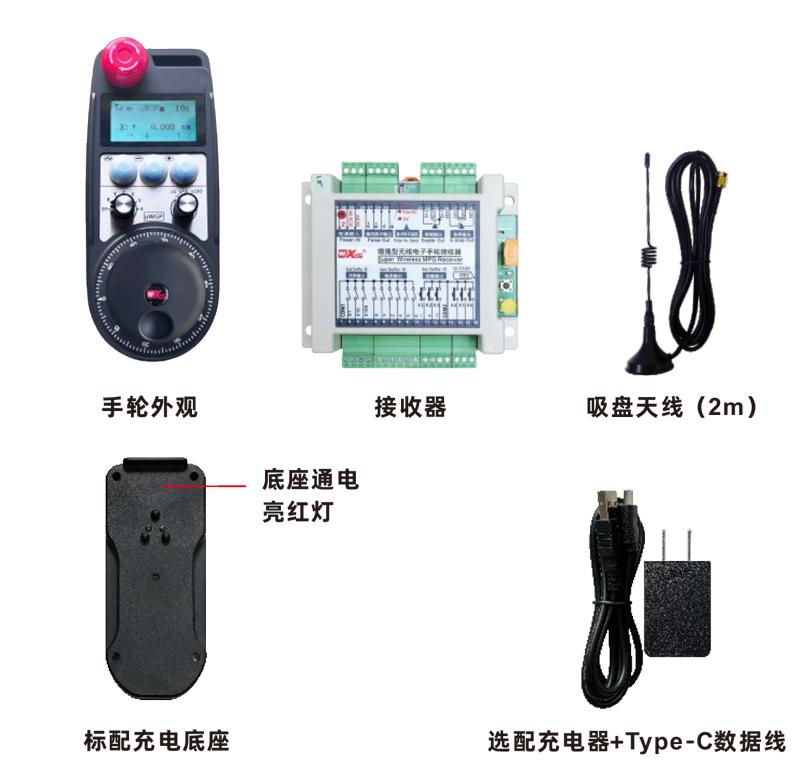

Product installation steps
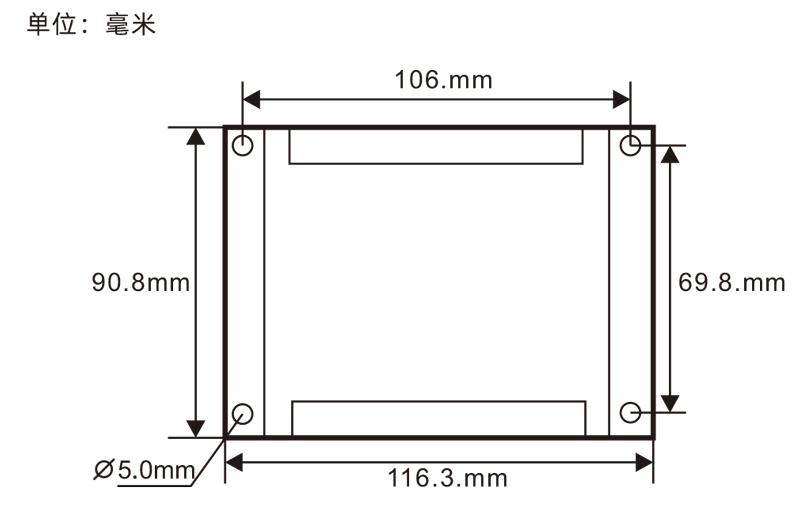
1.Install the receiver in the electric cabinet through the snap-on on the back,Or install it in the electrical cabinet through the screw holes at the four corners of the receiver.。
2.Refer to our receiver wiring diagram,Compare your on-site equipment,Connect the device through a cable and a receiver。
3.After the receiver is fixed,The antenna equipped with the receiver must be connected,And install the outer end of the antenna or place it outside the electric cabinet,It is recommended to place the signal on the top of the electric cabinet.,It is not allowed to disconnect the antenna,or will
The antenna is placed inside the electrical cabinet,It may cause the signal to be unusable。
4.Finally turn on the handwheel power switch,You can operate the handwheel remote control machine。
Receiver installation size
Receiver Wiring Reference Diagram
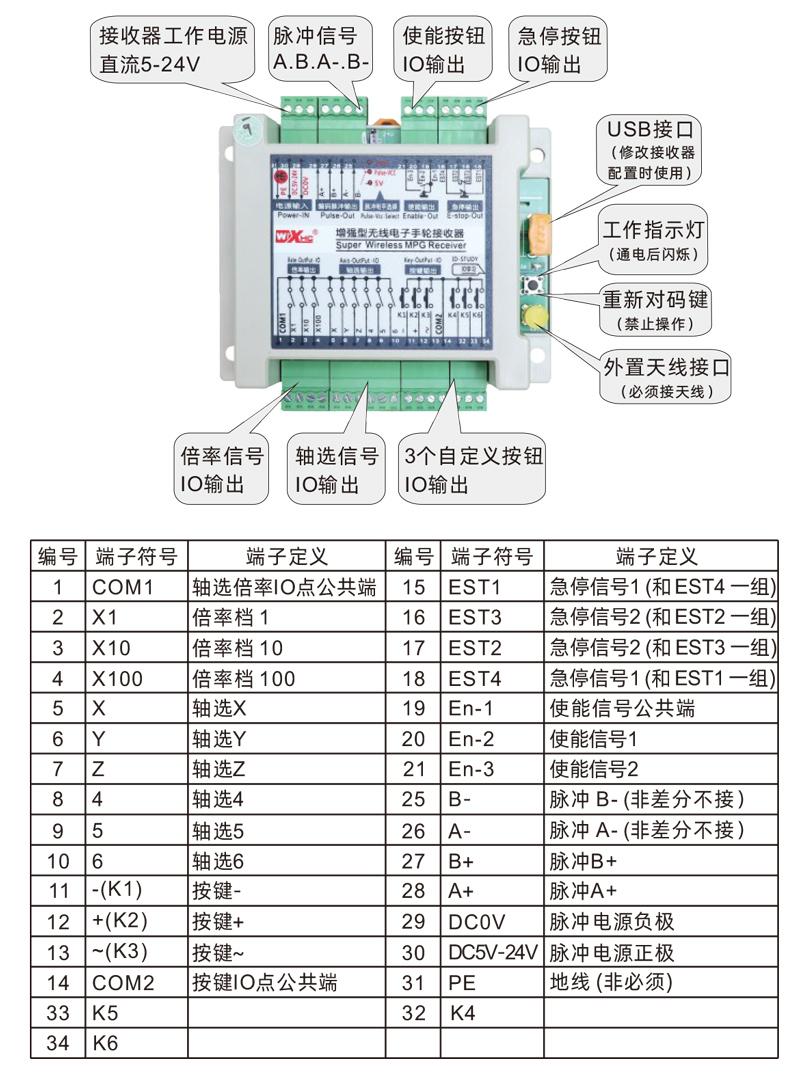

1.The machine is powered,The receiver is powered on,The receiver operating light is on,After the wireless electronic handwheel is fully charged, it switches from OFF to X-axis.,The handwheel display lights up。
2.Select the axis:Press and hold the enable button,Switch axle selection switch,Select the axis you want to operate。
3.Select the multiplier:Press and hold the enable button,Switch the magnification switch,Select the multiplier you need。
4.Move the axis:Press and hold the enable button,Select the axis and switch,Select the multiplier switch,Then turn the pulse encoder,Turn clockwise forward movement axis,Turn the negative movement axis counterclockwise。
5.Press and hold any custom button,The corresponding button IO output of the receiver is turned on,Release button output close。
6.Press the emergency stop button,The receiver disconnects the emergency stop IO output,Handwheel function fails,Release the emergency stop button,Emergency stop IO output closed,Handwheel function recovery。
7.Not operating the handwheel for a while,The handwheel automatically enters sleep standby,Reduce power consumption,When using again,The handwheel can be activated by pressing the enable button。
8.Don't use the handwheel for a long time,It is recommended to select the handshake to OFF gear,Turn off the handwheel,Extend battery life。


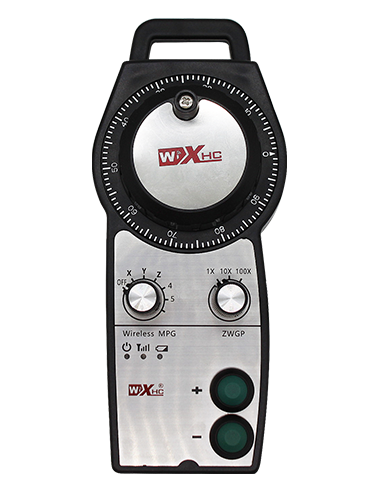
①:UWGP represents appearance style
②:Pulse output parameters:
01:Indicates that the pulse output signal is A、B;Pulse voltage 5V;Pulse number 100PPR。
02:Indicates that the pulse output signal is A、B;Pulse voltage 12V;Pulse number 25PPR。
03:Indicates that the pulse output signal is A、B、A-、B-;Pulse voltage 5V;Pulse number 100PPR。
04:Indicates low level NPN open circuit output,The pulse output signal is A、B;Pulse number 100PPR。
05:Indicates high level PNP source output,The pulse output signal is A、B;Pulse number 100PPR。
③:Represents the number of axis selection switch axes,6Represents 6 axes,7Represents 7 axes,and so on。
④:Represents the axis selection switch signal type,A represents point-to-point output signal,B represents the coded output signal。
⑤:Represents the signal type of the magnification switch,A represents point-to-point output signal,B represents the coded output signal。
⑥:Represents the number of custom buttons,3Represents 6 custom buttons。
⑦:Representative system handwheel power supply,05Represents 5V power supply,24Represents 24V power supply。
⑧:Represents contact charging mode,Return to the charging base to charge。

| Fault situation |
Possible Cause |
Troubleshooting Methods
|
|
Turn the OFF switch,Cannot turn on,
The display does not light up
|
1.Insufficient battery power
2.Handwheel failure
|
1.Charge the handwheel
2.Contact the manufacturer to return to the factory for maintenance
|
|
Handwheel boot,No response to operation,
During operation,Hand wheel display
When the screen signal indicator does not flash
|
1.The receiver is not powered
2.Receiver antenna not installed
3.The distance between the remote control and the machine is too far
4.Environmental interference
5.The enable button is not pressed during handwheel operation.
|
1.Check the receiver power on
2.Install the receiver antenna,Install the outer end of the antenna outside the electric cabinet to fix it
3.Operation at normal distance
4.① Optimize the wiring of the electric cabinet,Keep the receiver antenna wiring as far away from 220V and above lines as possible
②Try to use an independent switching power supply for the receiver power supply.,And add a power isolation module and
magnetic ring,Increase anti-interference ability
|
| Handwheel boot,
hint:chang battery
|
Insufficient battery power
|
Charging via cradle,or Type-C charging port to charge the handwheel
|
|
Press the button by handwheel,Or turn the switch,
Or the pulse encoder does not respond when shaking
|
1.Switch/button/pulse encoder damage fault
2.Receiver damage fault
|
1.Watch when you turn a switch or press a button or shake a pulse encoder,Is the signal indicator on the display flashing?,No
Lighting means switch or button or encoder failure,Need to return to factory for repair;Light means normal,Check the receiver wiring is
Is it normal?
2.Return to factory maintenance
|
|
After the receiver is powered on,
No light on the receiver
|
1.Power supply abnormality
2.Power wiring error
3.Receiver failure
|
1.Check if the power supply has voltage,Does the voltage meet the requirements
2.Check whether the positive and negative poles of the power supply are connected in reverse
3.Return to factory maintenance
|

1.Please at room temperature and pressure,Used in dry environments,Extend service life。
2.Please avoid getting wet in the rain、Used in abnormal environments such as blisters,Extend service life。
3.Please keep the handwheel clean,Extend service life。
4.Please avoid squeezing、Fall、Bumping, etc.,Prevent precision accessories inside the handwheel from damage or accuracy errors。
5.Not used for a long time,Please store the handwheel in a clean and safe place。
6.Pay attention to moisture-proof and shock-proof during storage and transportation。

1.Please read the instructions for use in detail before use,Non-professional personnel are prohibited。
2.Please charge in time when the battery is too low,Avoid errors caused by insufficient power, causing the handwheel to be unable to operate。
3.If repair is required,Please contact the manufacturer,If damage caused by self-repair,The manufacturer will not provide a warranty。



.png)