
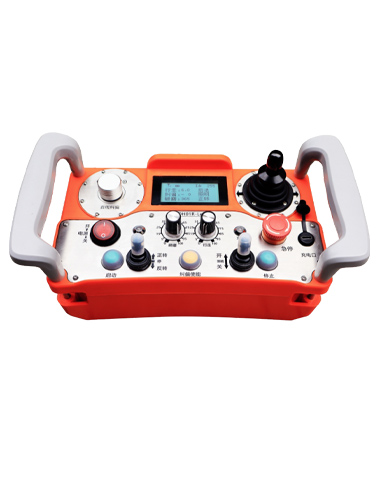
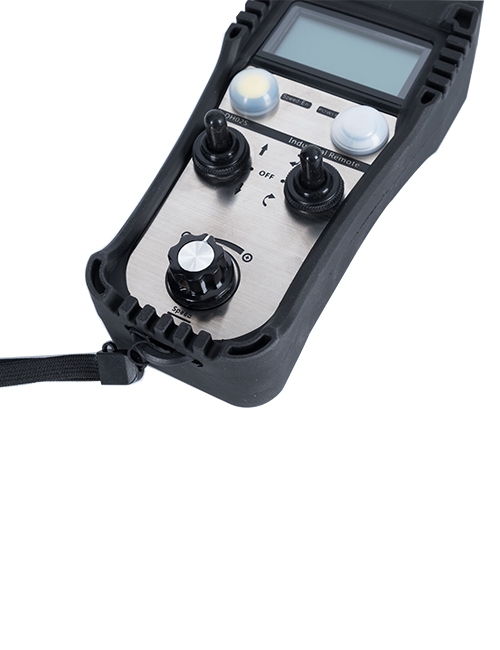
地坪机背带遥控器适用于各种地坪研磨机,采用485ModbusRTU 协议控制左右变频器的调速和前后左右控制,以及研磨电机变频器的调速和启动。左右电机采用360°摇杆操作,转弯控制更丝滑。同时支持IO控制,通讯控制,以及外部面板开关输入控制三种控制模式。
芯合成工业无线遥控器DH01R-LE
Description
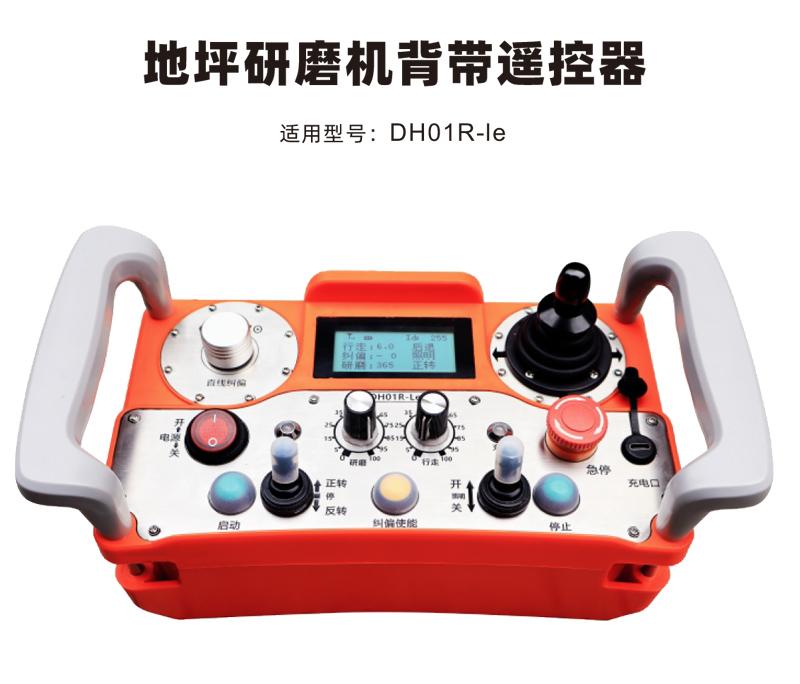

地坪机背带遥控器适用于各种地坪研磨机,采用485ModbusRTU 协议控制左右变频器的调速和前后左右控制,以及研磨电机变频器的调速和启动。左右电机采用360°摇杆操作,转弯控制更丝滑。同时支持IO控制,通讯控制,以及外部面板开关输入控制三种控制模式。

1.Adopt 433MHZ wireless communication technology,Wireless operating distance 100 meters。
2.Adopt automatic frequency hopping function,Use 32 sets of wireless remote controls at the same time,No effect on each other。
3.Supports all frequency converters with 485 modbus RTU protocol,The currently adapted inverter brands include:
Shanghai Xielin、Fuji、Huichuan、Zhongchen、INVT、Yasukawa Tatsu。If the brand is not adapted, please contact us for customization.。
4.支持研磨电机变频器调速、start up。
5.支持左右变频器调速、start up、Front and rear left and right controls。
6.支持左右变频器直线纠偏,Keep the machine moving in a straight line。
7.支持Type-C充电,5V-2A charging specifications,18650/3000mAh充电锂电池。
8.支持三种控制方式,IO接线控制,485 modbus通讯控制,外部开关输入控制。
9.采用防水设计,防水等级IP65。

| Handheld terminal working voltage and current | 18650/3000mAh电池-3.7V/32mA |
| Receiver operating voltage and current | 24V/1A |
| Handheld transmit power | 15dBm |
| Receiver Receive Sensitivity | -100dBm |
| Wireless communication frequency | 433Mhz frequency band |
| Operating temperature | -25℃<X<55℃ |
| 充电接口 | Type-C |
| Product size | 285.6*139.3*129.2(mm) |

Comments:
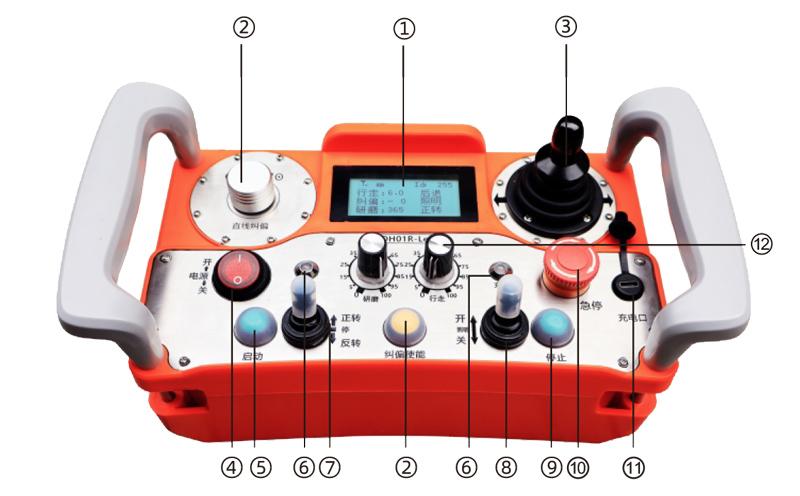
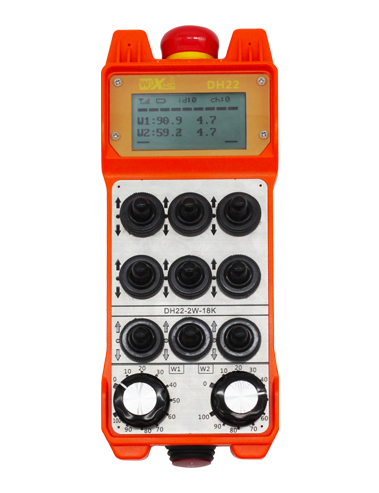
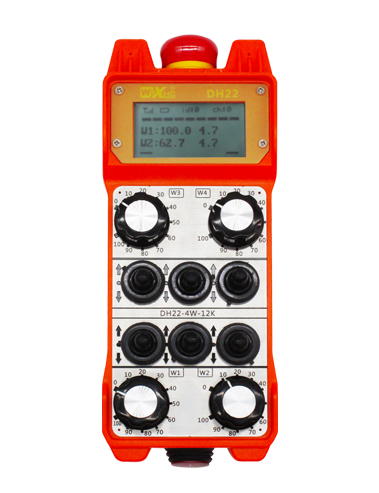
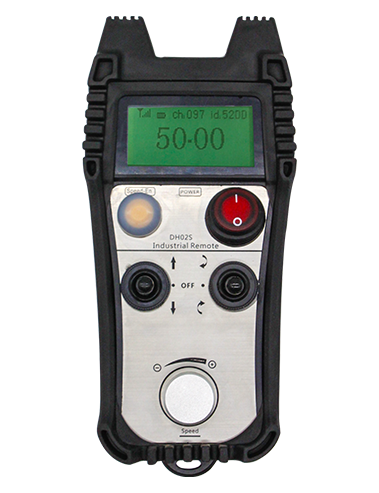
①Screen display:
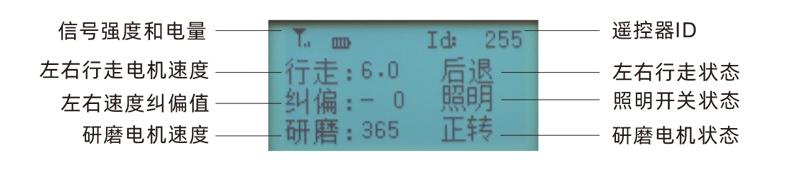
②直线纠偏:
采用组合操作对左右轮速度进行纠偏,按住<纠偏使能>,旋转<Straight line correction>进行纠偏,Rotate clockwise,进行正纠偏,右轮加速,Rotate counterclockwise,进行负纠偏,右轮减速。
纠偏范围90到-90,每个纠偏值约等于0.02V电压,最大纠偏电压1.8V。
③行走控制摇杆:
摇杆前推,左右电机同时前进,松手保持前进;摇杆后推,左右电机同时后退,松手保持后退,按下<stop>按钮停止机器。
摇杆左推,左右电机左转,前半段左轮减速转弯,后半段左轮后退转弯,松手恢复直行;摇杆右推,左右电机右转,前半段右轮减速转弯,后半段右轮后退转弯,松手恢复直行。
④Power switch:
遥控器屏幕开机和关机。
⑤启动按钮:
遥控器开机后,屏幕显示启动界面,需要按下启动按钮才能进入操作界面。
注意:按下启动按钮之前,请确认所有开关处于停止位。
⑥指示灯:
工作灯:遥控器开机后,常亮红灯;
充电灯:遥控器充电时,常亮红灯,充满亮绿灯;拔掉充电线,不亮灯。
⑦研磨启动:
控制研磨电机正转启动和反转启动。
⑧照明开关:
控制照明灯打开和关闭。
⑨停止开关:
按下停止按钮,控制机器停止前进或者停止后退。
⑩急停开关:
按下急停,遥控器显示急停ESTOP,所有开关输出断开,调速清零,所有操作无效;Release emergency stop,遥控器显示启动界面,调速恢复,照明恢复,其他开关依然断开,按下启动按钮进入操作界面,正反转输出恢复,调速恢复。
11 充电口:
Type-C充电口,不充电时,请盖紧防水盖,以免进水进灰。
12 电机调速:
研磨调速:旋转研磨旋钮,调节研磨速度,默认范围0-1500;
行走调速:旋转行走旋钮,调节行走速度,默认范围0.0-100;

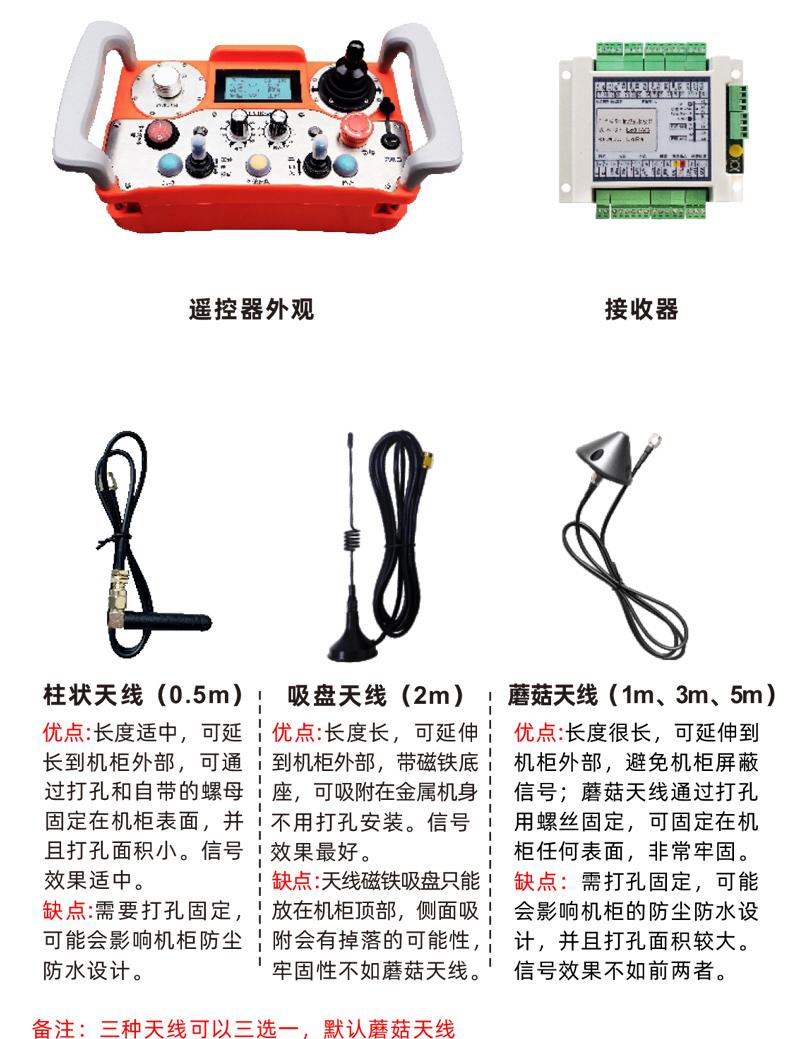

Product installation steps
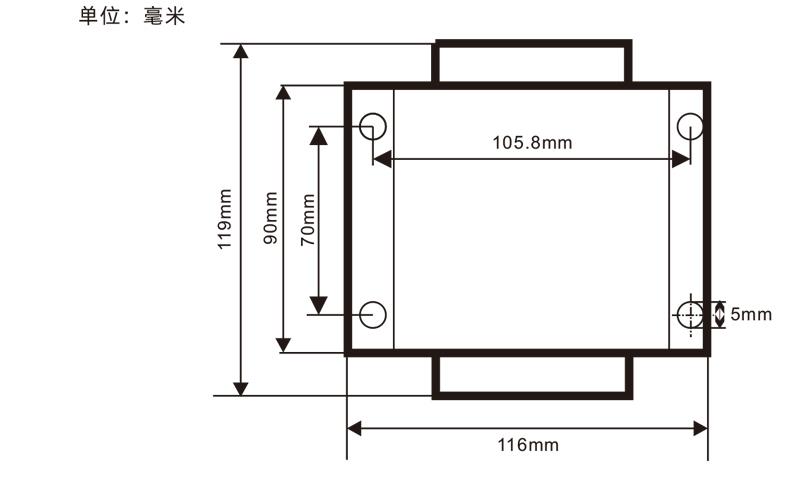
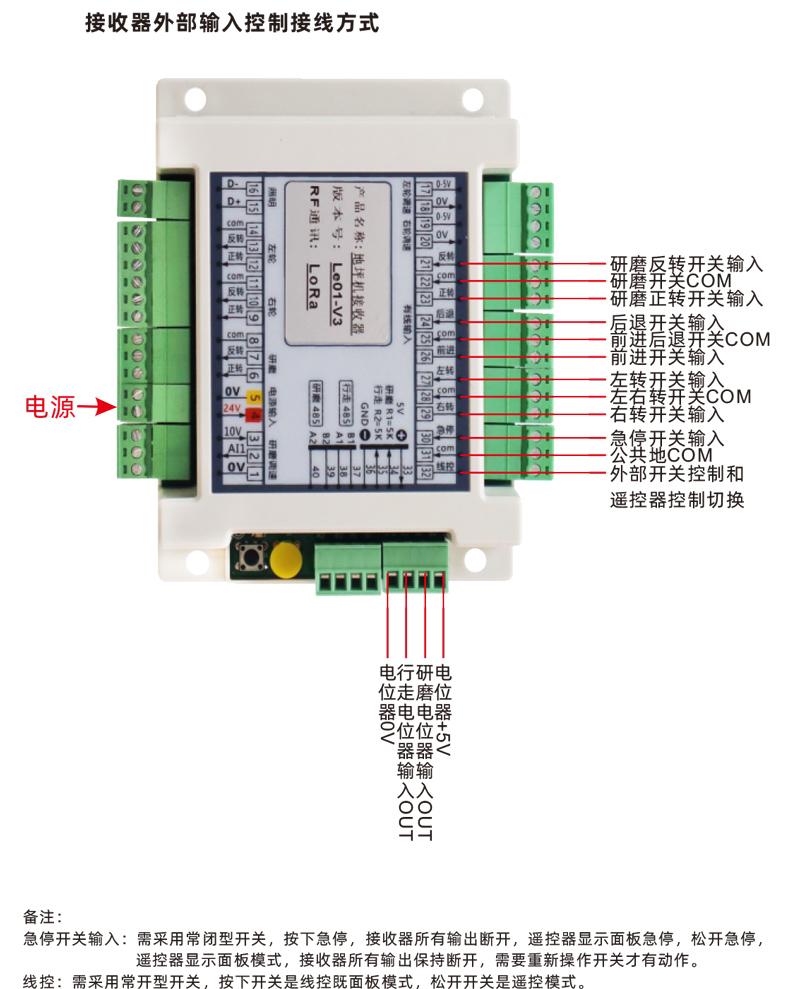
1.Install the receiver in the electric cabinet through the snap-on on the back,Or install it in the electrical cabinet through the screw holes at the four corners of the receiver.。
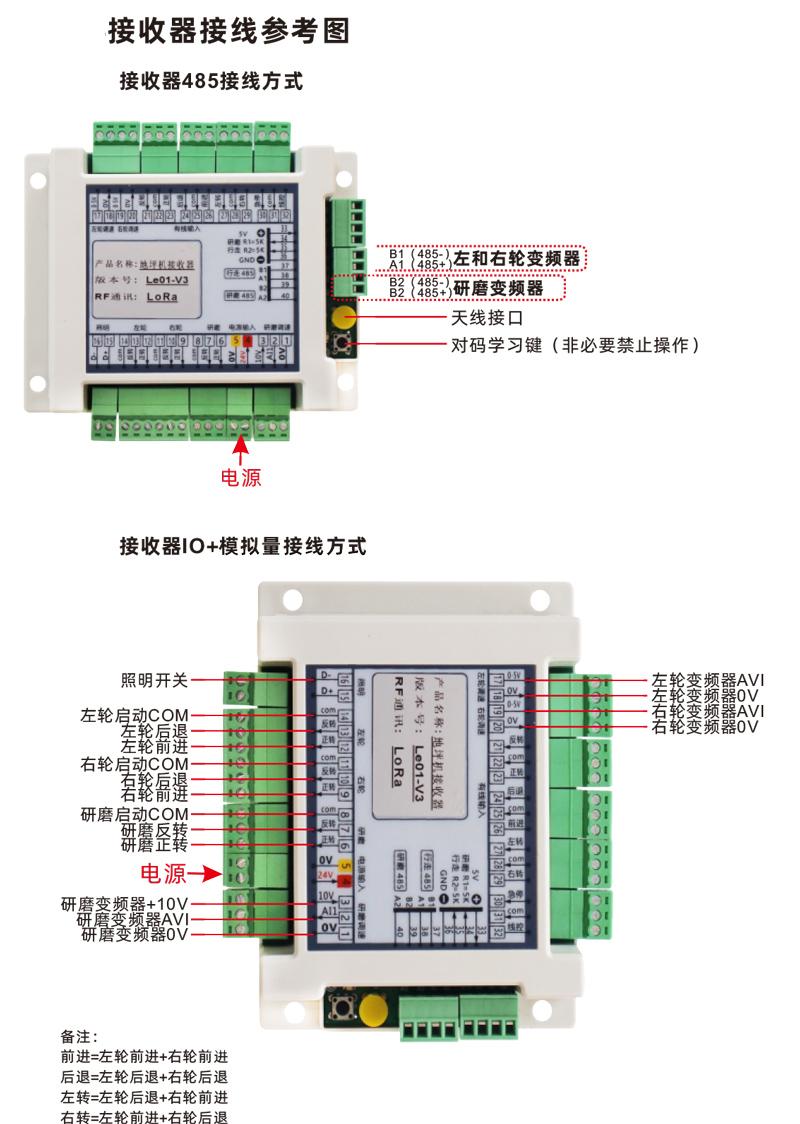
2.Refer to our receiver wiring diagram,Compare your on-site equipment,Connect the device to the receiver via wires。
3.After the receiver is fixed,The antenna equipped with the receiver must be connected,And install the outer end of the antenna or place it outside the electric cabinet,It is recommended to place the signal on the top of the electric cabinet.,It is not allowed to disconnect the antenna,Or place the antenna inside the electric cabinet,It may cause the signal to be unusable。
4.最后给遥控器充满电量,Then turn on the remote control power switch,The remote control display will show the normal working interface.,You can perform remote control operation。
Receiver installation size

Remote control parameter settings
Enter the remote control background parameter method:小电机速度调到0,Pull the forward rotation switch of the large motor upward 3 times in a row,Pull down 3 times in succession;
使用<Straight line correction>旋钮翻页,按下<start up>,转动<Straight line correction>旋钮修改参数,
After modification,Turn the page to the end,选择保存或不保存退出,按下<start up>退出菜单;
The parameters are as follows:
最小研磨速度:研磨电机初始速度,范围0-5000,默认0;
最小研磨电压:研磨电机初始输出电压,范围0-10,实际值为此值的1/2;默认0;
最大研磨速度:研磨电机最大速度值,范围0-5000,默认1500;
最大研磨电压:研磨电机最大输出电压,范围0-10,Default 10;实际输出为此值的1/2;
最小行走速度:行走电机初始速度,范围0-1000,默认0;
Remote control parameter settings
最小行走电压:行走电机初始输出电压,范围0-10,默认0;实际输出为此值的1/2;
最大行走速度:行走电机最大速度值,范围0-1000,Default 1000,对应屏幕显示100;
最大行走电压:行走电机最大输出电压,范围0-10,Default 10;实际输出为此值的1/2;
前后零位:摇杆前后方向中间零位设定,范围8-254,按住启动按钮,让摇杆自然居中,松开启动按钮,自动锁定零位值;
左右零位:摇杆左右方向中间零位设定,范围9-254,按住启动按钮,让摇杆自然居中,松开启动按钮,自动锁定零位值;
Frequency converter parameter setting
最大行走电压:行走电机最大输出电压,范围0-10,Default 10;实际输出为此值的1/2;
前后零位:摇杆前后方向中间零位设定,范围8-254,按住启动按钮,让摇杆自然居中,松开启动按钮,自动锁定零位值;
左右零位:摇杆左右方向中间零位设定,范围9-254,按住启动按钮,让摇杆自然居中,松开启动按钮,自动锁定零位值;
Remote control operating instructions
1.The machine is powered,Remote control turned on,按下<启动按钮>进入操作界面。
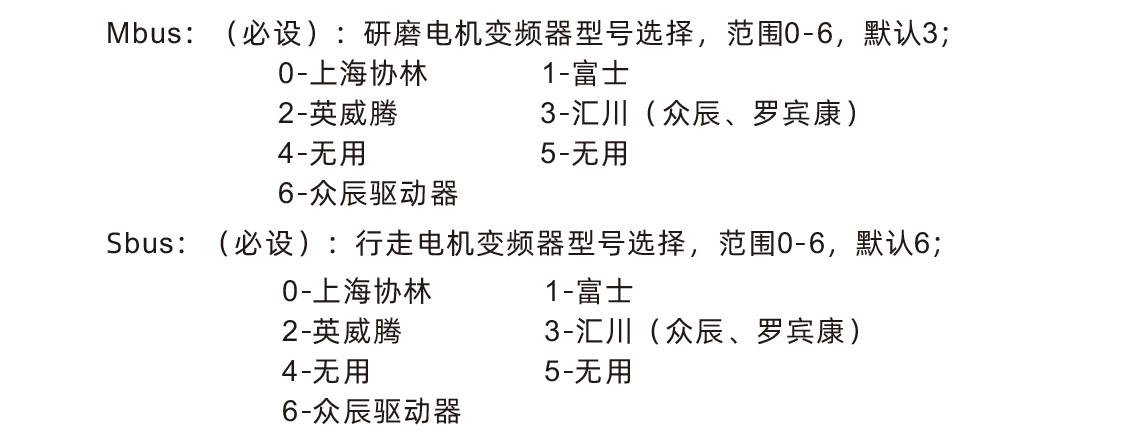
2.Enter the remote control background,Set the background parameters of the remote control,主要是设置行走和研磨电机变频器型号(机器厂家已设置的跳过这一步)。
3.设置好变频器的参数(机器厂家已设置的跳过这一步)。
4.扳动遥控器上的<illumination>开关,将照明灯打开。
5.调好研磨速度,扳动<正转>开关,启动研磨电机。
6.调好行走速度,扳动摇杆开关,控制机器前进或后退,以及转弯。

| Fault situation | Possible Cause | Troubleshooting Methods |
| Press the power switch, Cannot turn on and off, The display does not light up |
1.遥控器未安装电池或电池方向安装错误
2.Insufficient battery power
3.Remote control failure
|
1.Check the battery installation of the remote control
2.请充电
3.Contact the manufacturer to return to the factory for maintenance
|
|
Remote control turned on,
显示掉网重连
LostRF pls retry
|
1.The receiver is not powered
2.Receiver antenna not installed
3.The distance between the remote control and the machine is too far
4.Environmental interference
5.Before turning on the remote control,必须接收
器先通电,Turn on the remote control again
|
1.Check the receiver power on
2.Install the receiver antenna,Install the outer end of the antenna outside the electric cabinet to fix it
3.Operation at normal distance
4.① Optimize the wiring of the electric cabinet,The receiver antenna wiring should be kept away from 220V and
On line ② Try to use independent switching power supply to supply the receiver power supply as much as possible,and
Power cord adds power isolation module and magnetic ring,Increase anti-interference ability
|
|
Remote control turned on,
显示change battery
|
1.Insufficient battery power
2.Battery installation or poor contact
|
1.释放接收器上面的急停
2.检查急停开关是否故障,及时更换开关
|
|
Some buttons on the remote control
Or the switch does not respond
|
1.Switch damage failure
2.Receiver damage fault
|
1.Observe when flipping the switch,Is there a corresponding arrow on the display screen?;有箭
头显示,Indicates that the switch is normal;No arrow displayed means the switch is broken.,返
厂维修
2.Return to factory maintenance
|
|
After the receiver is powered on,
No light on the receiver
|
1.Power supply abnormality
2.Power wiring error
3.Receiver failure
|
1.Check if the power supply has voltage,Does the voltage meet the requirements
2.Check whether the positive and negative poles of the power supply are connected in reverse
3.Return to factory maintenance
|

1.Please at room temperature and pressure,Used in dry environments,Extend service life。
2.Please avoid getting wet in the rain、Used in abnormal environments such as blisters,Extend service life。
3.请注意充电口清洁,并在非充电时间将充电口盖子盖紧,以免进水进灰短路。
4.请避免遥控器被挤压和摔落,可能会导致遥控器损坏。
5.长时间不使用遥控器,请将遥控器存储在常温、干燥并且安全的地方。
6.Pay attention to moisture-proof and shock-proof during storage and transportation。

1.Please read the instructions for use in detail before use,Non-professional personnel are prohibited。
2.Please charge in time when the battery is too low,Avoid errors caused by insufficient battery power causing the remote control to be inoperable.。
4.If repair is required,Please contact the manufacturer,If damage caused by self-repair,The manufacturer will not provide a warranty。
(Remark:Product upgrade or upgrade situation,When purchasing products, please contact the sales staff for the latest product status)
-500x650.png)