

LXWGP-ETS-SIEMENS wired electronic handwheel
Description
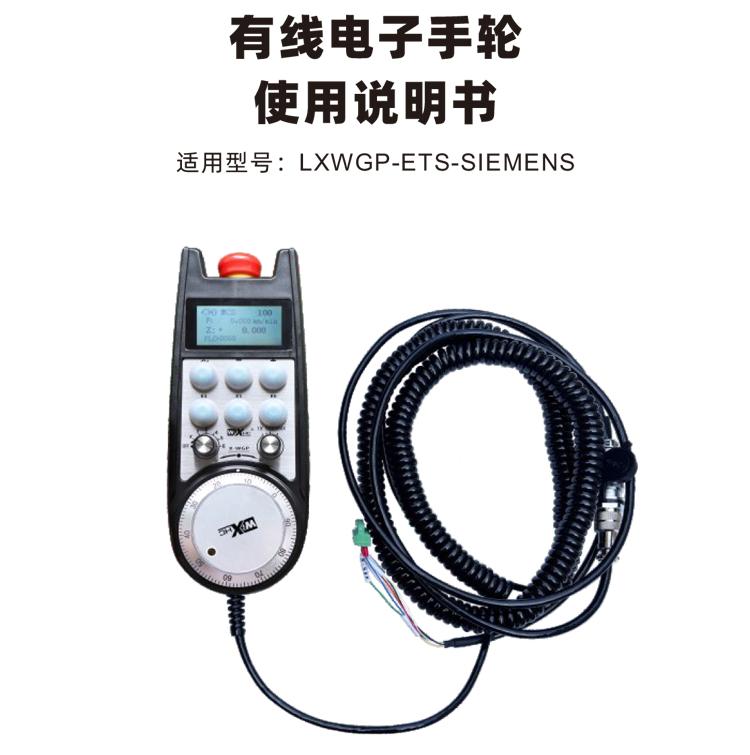

Electronic handwheel is used for manual guidance of CNC machine tools、position、Strike operation。This model of electronic handwheel is a Siemens wired electronic handwheel with real display.,The handwheel is connected to the X130 interface of the Siemens system through a network cable.,Read the system coordinates and display them to the LCD display of the handwheel through S7 protocol communication.,And the handwheel control system axis selection can be made through communication.、magnification、Button and other signals。

1.Connected using 6-core aviation plug cable,Handwheel cable length 10 meters。
2.The handwheel screen can display the system workpiece coordinates、Mechanical coordinates、Feed speed、Axis selection、Information such as magnification。
3.Support emergency stop button,Switching quantity IO signal output,Handwheel shutdown emergency stop is still effective。
4.Supports 6 custom buttons,Switching IO signal,Can output signals to the system through IO wiring or communication。
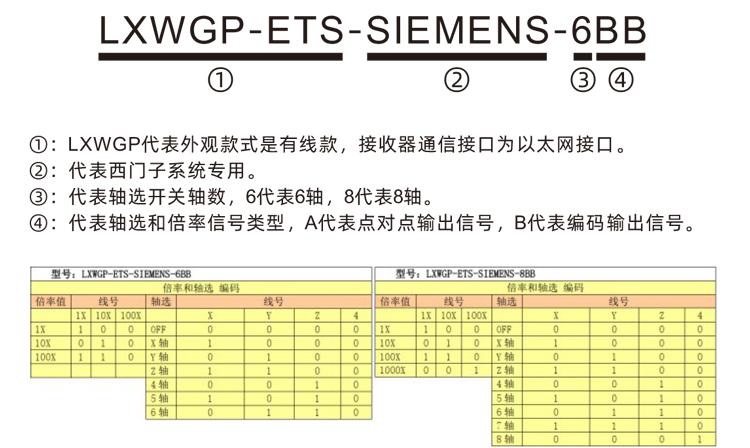
5.Supports 6 or 8 axis control,Switching IO signal,Can output signals to the system through IO wiring or communication。
6.Support 3 or 4 levels of magnification control,Switching IO signal,Can output signals to the system through IO wiring or communication。
7.Support pulse encoder,100Pulse/Circle,The signal can be output to the system through AB pulse wiring.。
8.Support Siemens S7 protocol,Support Siemens 828D、840DSL、ONE and other model systems。

| Handwheel working power supply voltage | DC24V/1A |
| Receiver power supply voltage | DC24V/1A |
| Receiver IO output load range |
DC24V
|
| Handwheel end cable length |
10m
|
| Receiver end cable length |
1m
|
| Receiver end network cable length |
3m
|
| Operating temperature |
-25℃<X<55℃
|
| Anti-fall height |
1m
|
| Customize the number of buttons | 6indivual |
| Product size | 233*90.7*77.4(mm) |

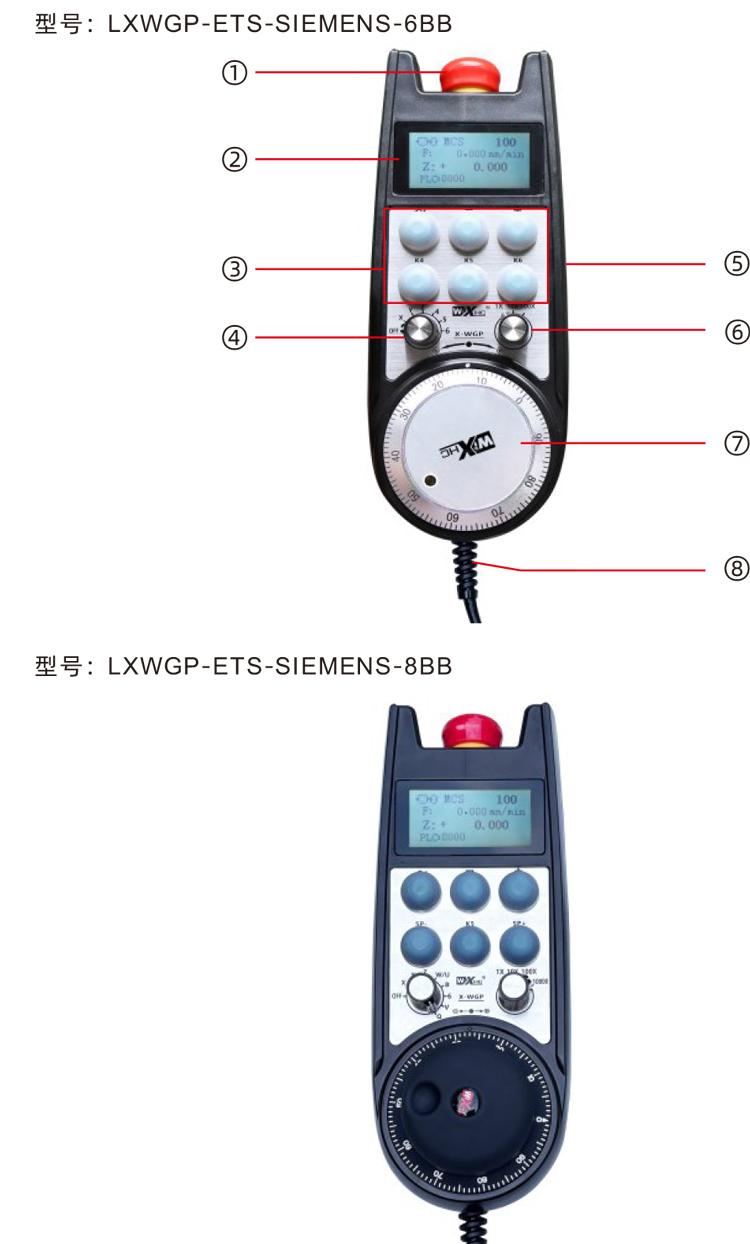
Comments:
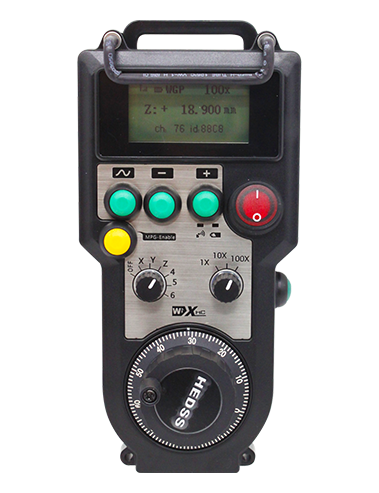
①Emergency stop button:
Press the emergency stop button,Two groups of emergency stop IO outputs on the receiver are disconnected,And all functions of the handwheel are invalid。
After the emergency stop is released,Emergency stop IO output closed on the receiver,All functions of the handwheel are restored。
②Screen display:
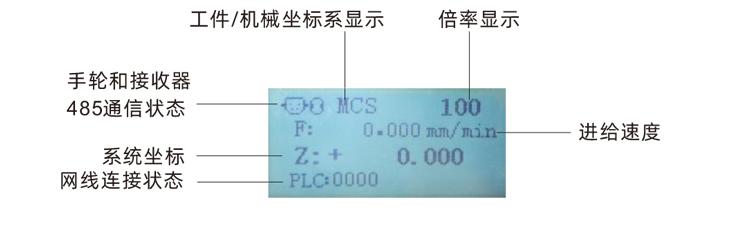
PLC:0000It means the network cable is not connected,PLC:1010It means the network cable and PLC system are connected successfully.,
PLC:1110Indicates that the handwheel writes system data successfully.,PLC:0001Indicates successful connection to computer。
③Custom button:
6Custom buttons,Each button corresponds to an IO output point on the receiver,Also connected to the system through communication。
④Axis selection switch:
Switching the axis selection switch can switch the moving axis controlled by the handwheel。
⑤Enable button:
Press and hold either enable button on either side,It is effective only by shaking the pulse encoder。 And the 2 sets of enabled IO outputs on the receiver are turned on,Release the enable button,Enable IO output disconnection。
⑥Magnification switch:
Switching the magnification switch can switch the magnification controlled by the hand wheel.。
⑦Pulse encoder:
Press and hold the enable button,Shaking pulse encoder,Send a pulse signal,Control the machine shaft movement。
⑧Hand wheel cable:
Cable connecting handwheel and receiver,aviation plug,For handwheel power supply and communication。

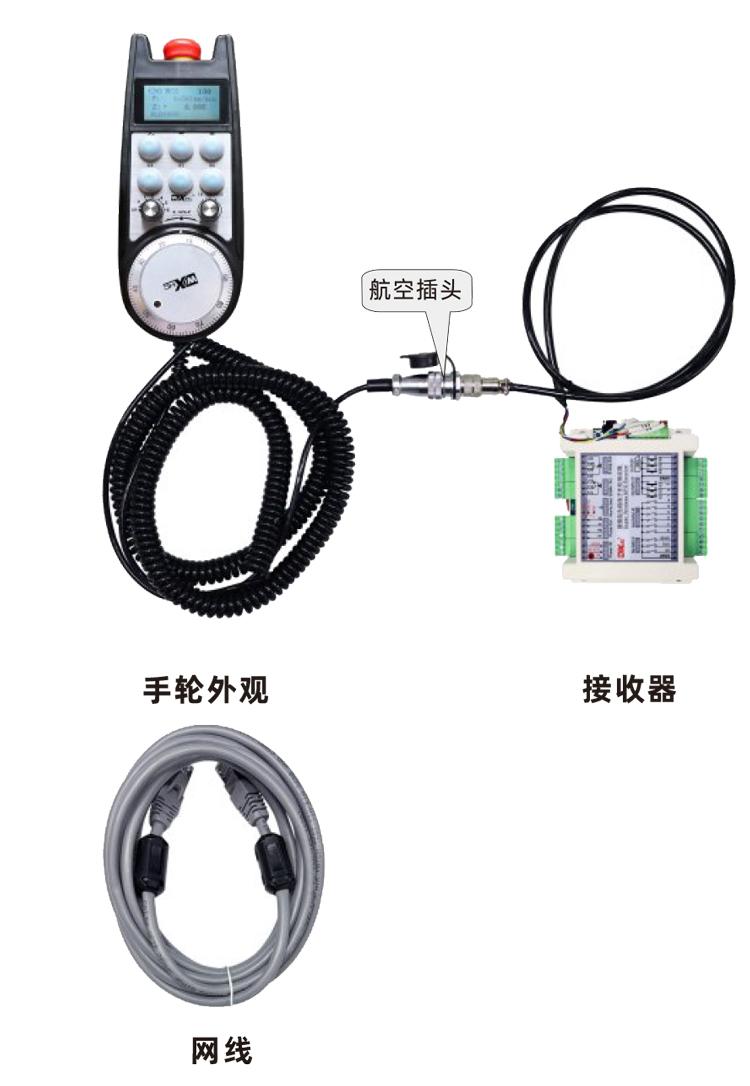

6.1Product installation steps
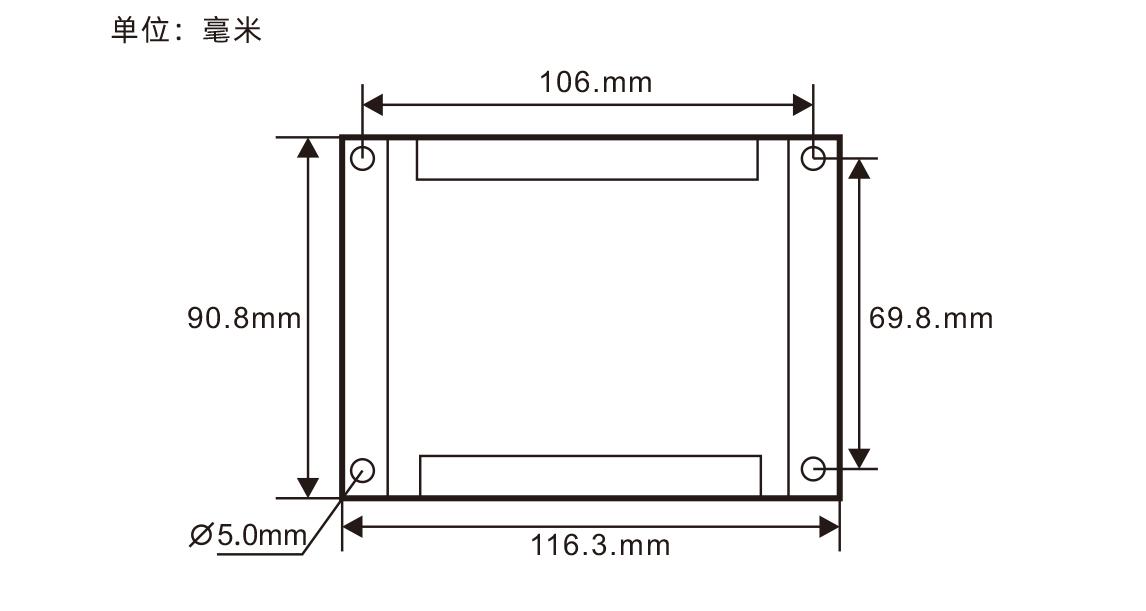
1.Install the receiver in the electrical cabinet through the screw holes at the four corners.。
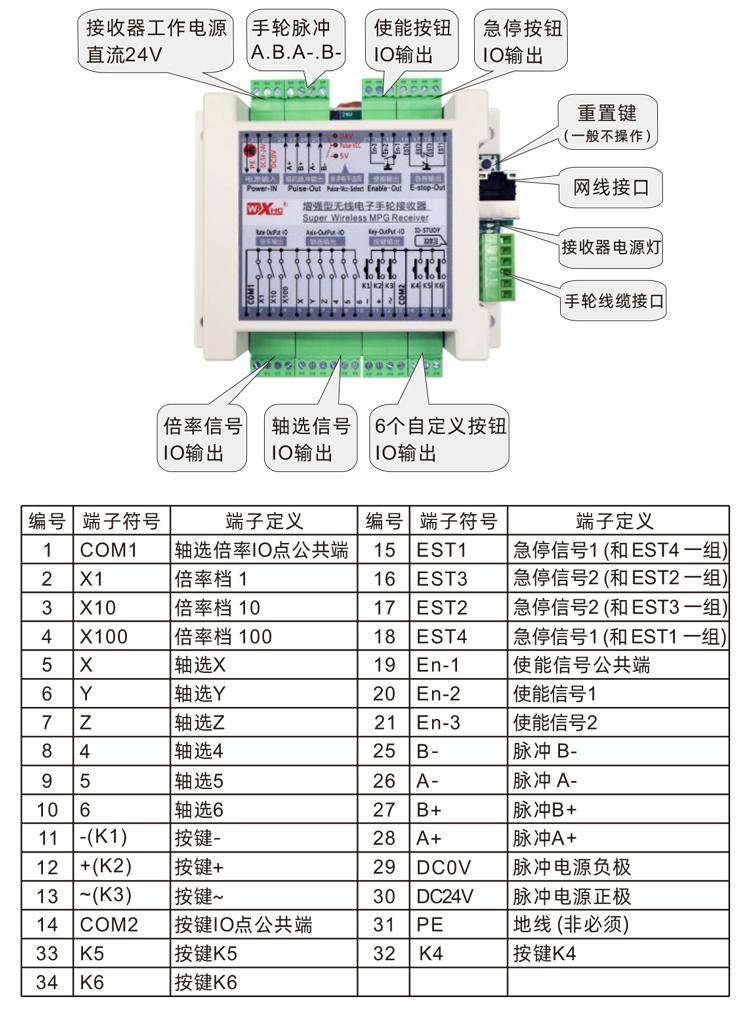
2.Refer to our receiver wiring diagram,Compare your on-site equipment,Connect the device through the cable and receiver
connect,Use a network cable to connect the receiver to the X130 interface of the system。
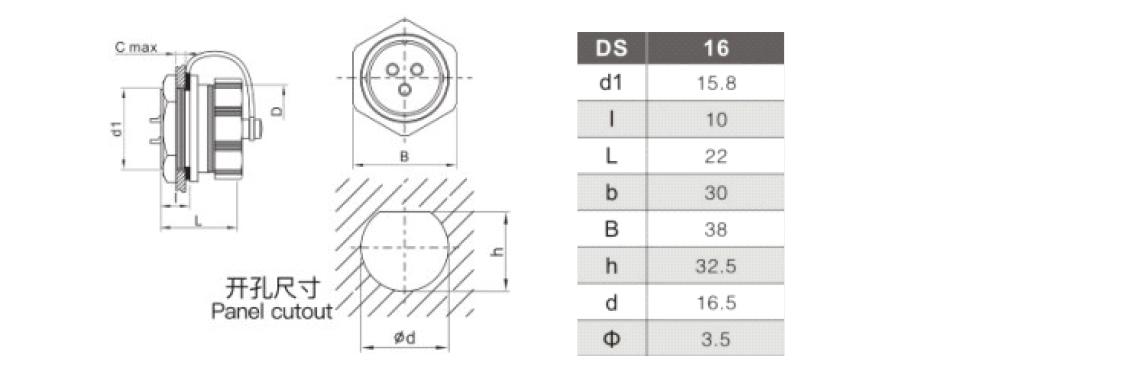
3.After the receiver is fixed,Install the aviation plug base into the handwheel opening on the panel,Another base
The terminal strip is plugged into the handwheel interface on the receiver.。Then insert the aviation plug of the handwheel end cable into the base,Tighten
fixtures。
6.2Receiver installation size
6.3Aviation plug installation dimensions
6.4Receiver Wiring Reference Diagram
6.2Receiver installation size
6.3Aviation plug installation dimensions
6.4Receiver Wiring Reference Diagram

1.The receiver is powered on,The receiver operating light is on,Connect the receiver to the computer using a network cable,Set a fixed IP address for your computer,Use the network configuration tool software to set network parameters for the handwheel function,Specific settings
For the method, please refer to "Instructions for Use of LXWGP-ETS Wired Handwheel"。
2.After receiver setup is complete,The system requires programming PLC program,For details, please refer to "LXWGP-ETS Setting Methods for Different Siemens CNC Systems" and PLC program routine information。
3.After the above settings are completed,Take the receiver to the machine electrical cabinet and install it,Unplug the network cable from the computer and plug it into the X130 interface of the system,Plug in the receiver power and pulse wires。
4.The machine is powered,The receiver is powered on,The receiver operating light is on,Turn on the handwheel power switch,Handwheel screen boot,Screen display PLC:1010,Indicates successful communication between the handwheel and the system.。
5.Select axis selection:Switch axle selection switch,Select the axis you want to operate。
6.Select the multiplier:Switch the magnification switch,Select the multiplier you need。
7.Move the axis:Press and hold the enable button,Select the axis and switch,Select the multiplier switch,Then turn the pulse encoder,Turn clockwise forward movement axis,Turn the negative movement axis counterclockwise。
8.Press and hold any custom button,The corresponding button IO output of the receiver is turned on,Release button output close。
9.Press the emergency stop button,The receiver disconnects the emergency stop IO output,Handwheel function fails,Release the emergency stop button,Emergency stop IO output closed,Handwheel function recovery。


| Fault situation | Possible Cause |
Troubleshooting Methods
|
|
|
Troubleshooting Methods
|
1.Whether the aviation cable between the handwheel and the receiver is connected correctly and reliably
2.Is the receiver power voltage sufficient?
3.Handwheel failure
|
1.Check the connection of the aviation cable between the handwheel and the receiver
2.Check receiver input power
3.Contact the manufacturer to return to the factory for maintenance
|
|
| No response when operating the handwheel |
1.Are the network cables between the receiver and system connected?
2.Is the system PLC program written well?
3.Is the receiver configuration set correctly?
4.Is the 485 communication icon displayed on the handwheel display failed?
5.When operating the handwheel,You need to press and hold the enable buttons on both sides
6.Is the emergency stop button released?
|
1.Check whether the receiver and system X130 network port are connected with a network cable
2.Check and confirm whether the system PLC is written according to the reference materials we provided.
3.Check whether the receiver refers to our information and provided tool software,Correctly set the network parameters and DB address of the receiver, etc.
4.Check between handwheel and receiver
6core green socket,Two of the communication lines:485-A and 485-B,Is it correctly and securely connected?,Is there any circuit break?
|
|
|
After the receiver is powered on,The work light on the receiver does not light up
|
1.Power supply abnormality
2.Power wiring error
3.Receiver failure
|
1.Check if the power supply has voltage,
Does the voltage meet the requirements
2.Check whether the positive and negative poles of the power supply are connected in reverse
3.Return to factory maintenance
|

1.Please at room temperature and pressure,Used in dry environments,Extend service life。
2.Please avoid getting wet in the rain、Used in abnormal environments such as blisters,Extend service life。
3.Please keep the handwheel clean,Extend service life。
4.Please avoid squeezing、Fall、Bumping, etc.,Prevent precision accessories inside the handwheel from damage or accuracy errors。
5.Not used for a long time,Please store the handwheel in a clean and safe place。
6.Pay attention to moisture-proof and shock-proof during storage and transportation。

1.Please read the instructions for use in detail before use,Non-professional personnel are prohibited。
2.After any abnormal situation occurs in the handwheel,Please stop using it immediately,and troubleshoot,Before troubleshooting,It is forbidden to use the faulty handwheel again,Avoid safety accidents due to unknown handwheel failures;
3.If repair is required,Please contact the manufacturer,If damage caused by self-repair,The manufacturer will not provide a warranty。

.png)